 Fluxx Tech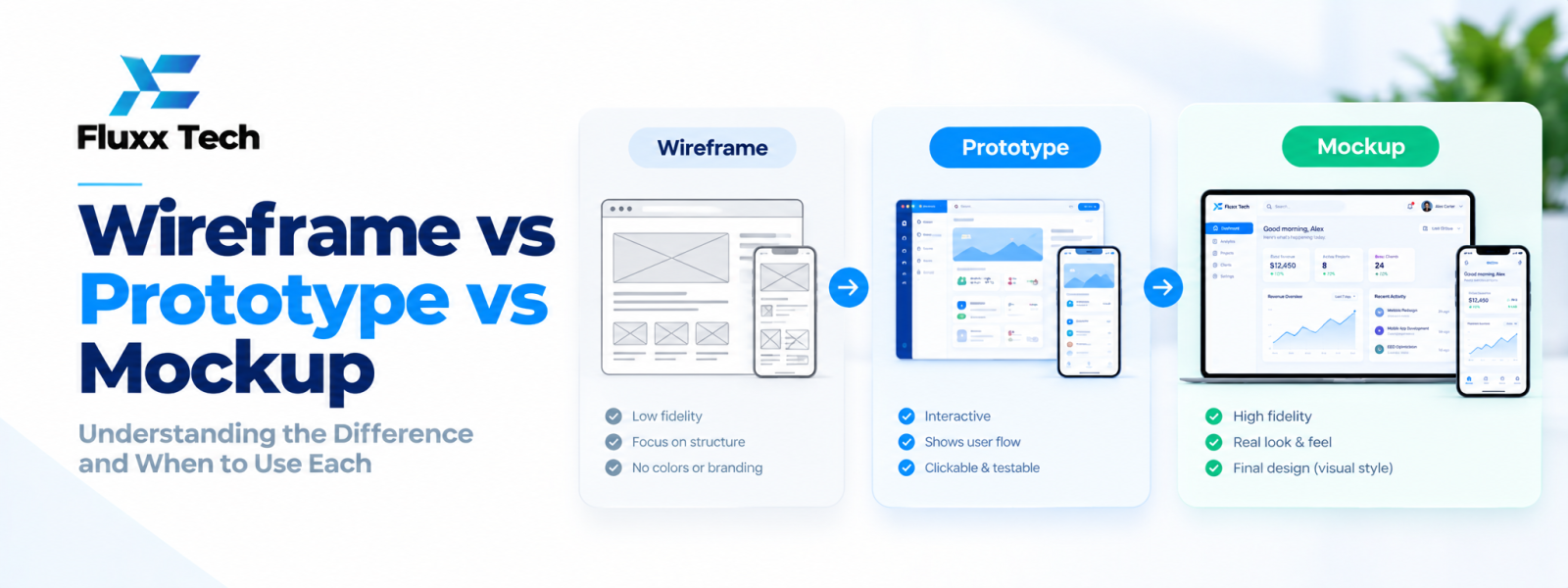
Wireframe vs prototype vs mockup is a common question when planning an app or website. These terms describe different ways to communicate and test a design. A wireframe usually focuses on structure, a mockup shows the visual direction, and a prototype demonstrates how parts of the experience may work. Teams may combine or adapt these stages depending on the project.
What is a wireframe?
A wireframe is a simplified representation of a screen or page. It shows the placement of content, navigation, controls and major sections without requiring final colours or detailed visual styling. Wireframes help teams discuss hierarchy and layout before spending time polishing the interface.
They can be low-fidelity sketches or more structured digital layouts. The best format is the one that makes the current design question easy to review.
What is a mockup?
A mockup is a static visual representation of the interface. It may include typography, colours, icons, imagery and detailed spacing. Mockups help stakeholders review the visual direction and consistency before implementation.
A mockup may look close to the final screen, but it does not necessarily behave like a working product. Buttons and transitions may be shown visually without being interactive.
What is a prototype?
A prototype simulates some aspects of the user experience. It can connect screens and let a person click through a journey, such as onboarding, booking or checkout. Prototypes vary in fidelity: some are simple clickable layouts, while others include more detailed interactions.
Prototypes help test whether the flow makes sense and gather feedback before the team builds the full product.
Wireframe vs prototype vs mockup
A wireframe answers: “What content and structure should this screen have?” A mockup answers: “What should the interface look like?” A prototype answers: “How will a user move through this experience?” These are useful distinctions, but real projects may use a combined workflow rather than separate formal documents.
When should each be used?
Use wireframes early when requirements or page structure need discussion. Use mockups when visual design, branding and component consistency need approval. Use prototypes when the team needs to test navigation, interaction or a multi-step journey. A simple landing page may need only a few stages, while a complex app may need more detailed prototypes.
How tools such as Figma fit in
Design tools can support wireframes, high-fidelity mockups, reusable components and clickable prototypes in one workspace. The tool does not replace a clear process. Teams still need to decide what question they are testing, who will review the work and how feedback will be recorded.
How to review a design deliverable
Give reviewers a specific task: check information order, review brand direction or complete a booking flow. Ask them to identify confusion and missing requirements rather than only giving general opinions. Record decisions and distinguish essential changes from personal preferences.
Avoid unnecessary design effort
Do not create high-fidelity mockups for every possible idea before validating the basic workflow. Start with the lowest level of detail that can answer the current question, then increase fidelity as decisions become clearer. This helps teams use time where it has the greatest value.
Conclusion
Strong UI/UX work begins with user needs and clear business goals. Focus on the tasks people need to complete, test important flows, and refine the interface using evidence. A practical design process helps teams make better decisions before and after development.
Frequently Asked Questions
Q: Can a wireframe be interactive?
A: Yes. Some wireframes include clickable navigation, although the main purpose is usually to show structure.
Q: Is a mockup the same as a prototype?
A: Not necessarily. A mockup is typically a static visual design, while a prototype simulates interactions or flows.
Q: Do small websites need all three?
A: Not always. The process should match the project’s complexity and the decisions that need testing.
Q: Can Figma create wireframes and prototypes?
A: Yes, design tools such as Figma support different levels of fidelity and clickable prototypes. Specific features may change over time.


