 Fluxx Tech
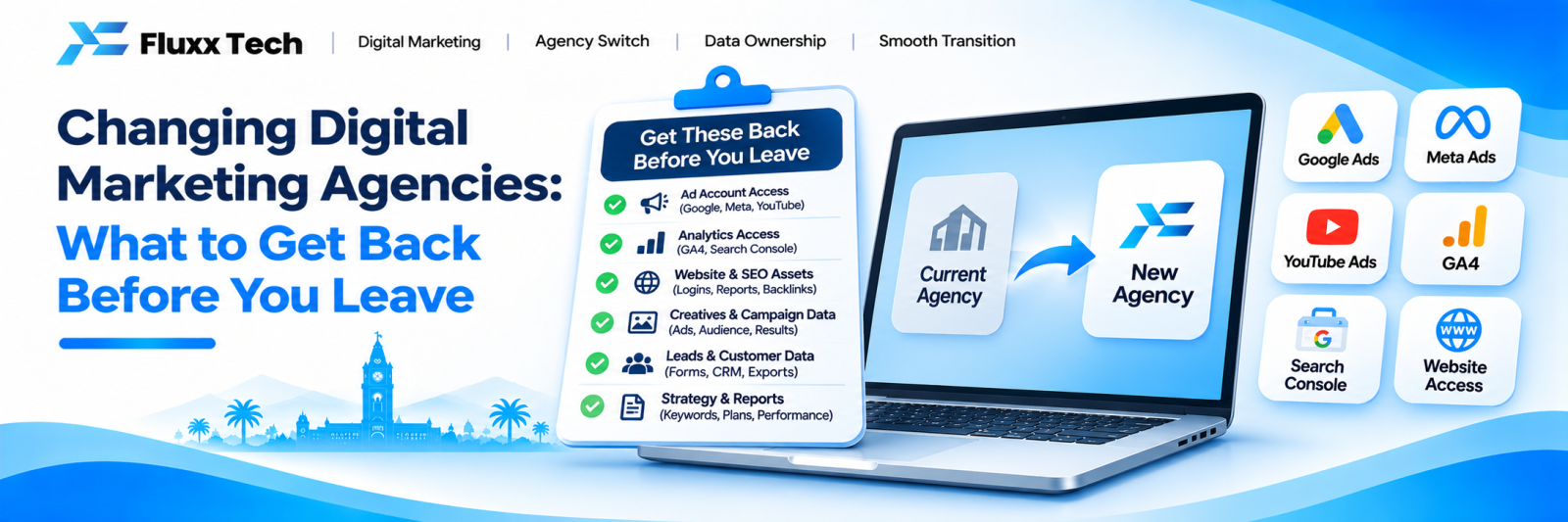
Ending an agency relationship is straightforward if you do it in the right order and painful if you do not.
The painful version looks like this: you send the termination email, access is revoked the same day, and you discover the domain is registered in the agency’s name, the Google Ads account belongs to them, two years of Analytics history is gone, and nobody has the login for the website.
This is avoidable. The rule is simple: secure everything first, then terminate.
The correct order
1. Decide quietly, tell nobody outside your business
2. Make a list of everything that exists
3. Secure ownership of each item
4. Verify that you can log in independently
5. Take backups
6. Then give notice
Steps 2 to 5 take a week. Doing them after step 6 is how businesses lose things.
What you must secure
Domain name
This is the one that causes the worst damage, because losing the domain means losing your email, your website and your search history at once.
Check | How |
Who is the registrant? | Log in to the registrar, or run a WHOIS lookup |
Do you have the registrar login? | Try logging in yourself |
Is it in your business name? | Registrant organisation and email should be yours |
When does it expire? | Set your own renewal reminder |
If it is in the agency’s name, request a transfer to your own registrar account in writing, before anything else. This is the single most important item on the list.
Website and hosting
• Hosting control panel login
• CMS or admin login, with an administrator account in your name
• FTP or SFTP details
• Database access
• SSL certificate details and renewal date
• A full backup — files and database — downloaded and stored by you
Take the backup yourself. Do not accept a promise that one exists.
Google accounts
Account | What you need |
Google Search Console | Verified owner, in your own Google account |
Google Analytics | Administrator on the property, not just viewer |
Google Business Profile | Primary owner |
Google Ads | Ownership of the account, or at minimum admin access |
Google Tag Manager | Publish-level access |
Google Merchant Center | Admin, if you sell products |
On Analytics specifically: if the agency created the property inside their own account, you may be able to get admin access but not ownership. If so, request that the property be transferred to your account. Historic data cannot be moved between properties, so a fresh start means losing your history — worth resolving before you leave.
On Google Ads: an account created under the agency’s manager account can usually be unlinked and kept, with its history. Ask explicitly for the account to remain yours, with its campaign and conversion history intact.
Meta and social accounts
• Facebook Page — you as admin, ideally the only one when the transition completes
• Instagram account — login credentials, not just access through the agency’s tools
• Meta Business Manager — your business should own the assets, with the agency as a partner that can be removed
• Ad account ownership and payment method
• Pixel ownership
• Any other platform — LinkedIn, YouTube, X
The common trap: the agency created the Business Manager and added your Page to it. That means they own the container. Request that the Page and ad account be transferred into a Business Manager owned by you.
Content and creative
Anything created for you should be yours. Ask for it in files, not links.
• All blog articles and page copy, in editable format
• Design files — logos, graphics, templates, in source format (AI, PSD, Figma), not just exported JPGs
• Photographs and videos shot for you, including raw files
• Ad creative and copy
• Any documents — keyword research, content plans, audits, strategy decks
The source files matter. A logo as a JPG cannot be resized or recoloured properly; the vector file can.
Data and reports
• All monthly reports from the engagement
• Keyword lists and current positions
• Backlink list
• Email marketing list and templates, exported
• CRM or lead data collected on your behalf
• Any customer contact data — this is yours and you are responsible for it
Other logins
• Email hosting and admin
• Directory listings — JustDial, Sulekha, IndiaMART, GoodFirms, Clutch and similar
• Review platform accounts
• Any SaaS tool bought in your name
• Payment gateway and e-commerce admin
The verification step people skip
Collecting credentials is not the same as having access.
For every account on your list:
1. Log in yourself, from your own device
2. Confirm your role is owner or admin, not editor or viewer
3. Where possible, remove recovery emails and phone numbers that belong to the agency
4. Turn on two-factor authentication under your own number
5. Change the password once the handover is complete
An account you have never logged into is an account you do not have.
How to ask
Keep it professional. Most agencies hand over properly when asked clearly, and a cooperative handover is worth far more than a confrontational one.
Subject: Account access and handover
Hi [Name],
As part of reviewing our setup internally, we would like to make sure all accounts and assets relating to our business are registered in our own name and that we hold owner-level access.
Could you confirm the status of the following, and transfer ownership where it is not already with us:
• Domain registration and registrar access
• Hosting and website admin
• Google Search Console, Analytics, Business Profile, Ads
• Meta Business Manager, Page, Instagram, ad account, pixel
• Source files for all design work
• All content created for us
Please also send a copy of the most recent full website backup.
Thanks, [Name]
Note what this does not say: it does not announce that you are leaving. Secure first.
Giving notice
Once everything is verified:
• Check your contract for the notice period and give it in writing
• Agree a specific end date
• Agree what happens to work in progress
• Agree the final invoice
• Ask for a handover document covering what was done, what is pending, and anything the next team should know
• Set a date to remove their access from your accounts
Then remove their access on that date — do not leave it for later and forget.
After the change
Audit before rebuilding. Before the new team changes anything, document the current state: rankings, traffic, indexed pages, campaign structure, site speed. Without a baseline you cannot tell whether things improve.
Do not let the new agency rebuild everything immediately. A new team often wants to redo the website and restructure campaigns. Sometimes that is right. Often it destroys ranking history and performance data for no reason. Ask what will be preserved and why.
Check for sabotage, calmly. It is rare, but worth verifying: is noindex still off, are redirects intact, are ad campaigns still running, is the Business Profile untouched.
Keep paying for anything critical that was on the agency’s card until it is moved — domain renewal above all.
Frequently asked questions
The agency refuses to transfer the domain. What can I do? Check who paid for it and what the contract says. If your business paid and the contract does not assign it to them, you have a strong position. Registrars have dispute processes. This is also the reason to always register the domain yourself.
Can I take my Google Ads history with me? Usually yes, if the account is unlinked from their manager account rather than deleted. Ask specifically for the account to be released with history intact.
Will changing agencies hurt my rankings? Not in itself. It hurts when the new team rebuilds the site without redirects, or removes content that was ranking. Insist on an audit before changes.
Should I tell them why I am leaving? You do not have to. If the relationship was reasonable, honest feedback is a courtesy. Keep it factual and avoid an argument you do not need to have.
What if I discover things were never set up at all? Document what exists, accept the starting point, and move on. Pursuing it rarely recovers anything. Build correctly from here.
How long should the whole process take? One week to secure and verify. Then whatever your notice period is. Do not compress the first week.